Local-first · Windows 10/11 · Open source

Find that shot.
Across every drive.

A desktop app that catalogs, tags, and instantly searches your entire local video archive — internal disks, externals, offline drives — without ever moving, renaming, or modifying a single source file.

0 files touched on disk 100% local & offline GPLv3 open source
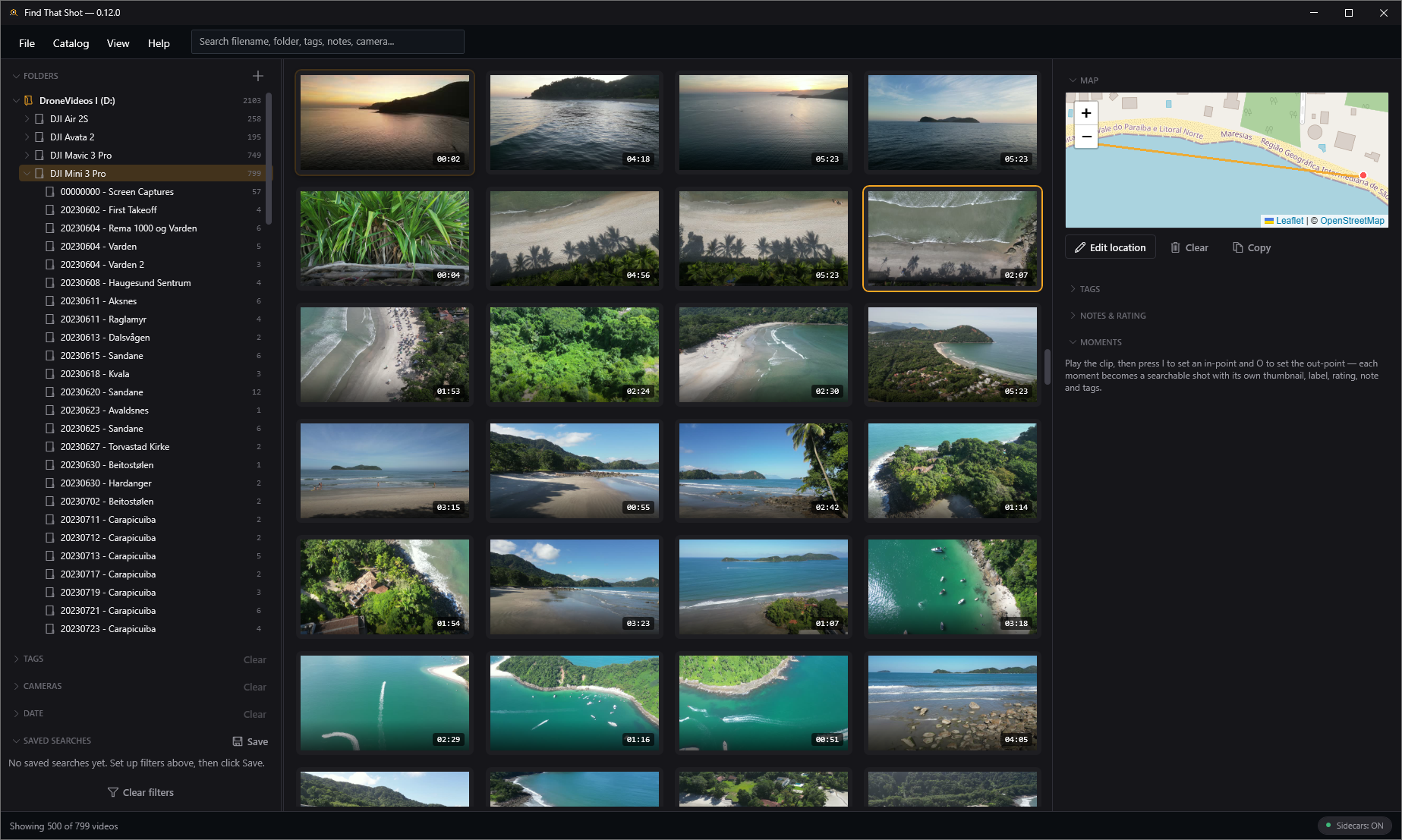
Find That Shot main window — a grid of drone clip thumbnails with a folders sidebar and a location map in the detail panel.

Your footage is never modified. Source video files are never moved, renamed, deleted, or touched — the app only writes its own catalog, thumbnails, and (optionally) sidecar files.

Built for big archives

Everything you need to find a single clip in thousands

Catalog once, then slice your library by text, tags, rating, status, camera, date, location, and more — even for clips on drives that are currently unplugged.

Instant search & smart collections

AND-matched tokens across filename, path, location, notes, camera & tags. Save any filter combo as a live, self-updating collection.

Moments — mark the exact shot

A shot is rarely a whole file. Drop timestamped in/out markers with their own label, rating, notes & tags, and jump straight back to them.

Built-in player & Review mode

Preview clips in-app with an FFmpeg-powered player (H.264/265, ProRes, DNxHD…) while you tag, rate and take notes side-by-side.

Browse on a map

Every geotagged clip plotted on a clustered offline map. Click a region to scope your whole grid to "where did I shoot that?"

Browse by date

A year-by-month heatmap bucketed by when footage was actually captured. Click a month to scope the grid to it.

Find duplicates

Instantly group copies by metadata fingerprint — even across offline backups — and clear redundant catalog entries (never the files).

Local AI tagging & NL search

Opt-in CLIP model runs fully offline on your CPU. Get subject-tag suggestions and search by plain English — "drone shot over snowy mountains at sunset."

Portable sidecar files

Optionally write a tiny JSON next to each video so your tags, ratings, notes & moments travel with the footage to any machine.

Stats & automatic backups

A read-only dashboard of your whole archive, plus rotating, restorable backups of your catalog so curation work is never lost.
Made for aerial archives

Drone footage gets superpowers

Drop in your DJI clips and Find That Shot reads the .SRT flight logs that ship next to them — turning raw footage into a geotagged, flyable, fully-searchable map of where you've been.

  • Auto-geotagged on scan

    The GPS takeoff fix is lifted straight from the flight log — no manual tagging needed.

  • Full flight path on the map

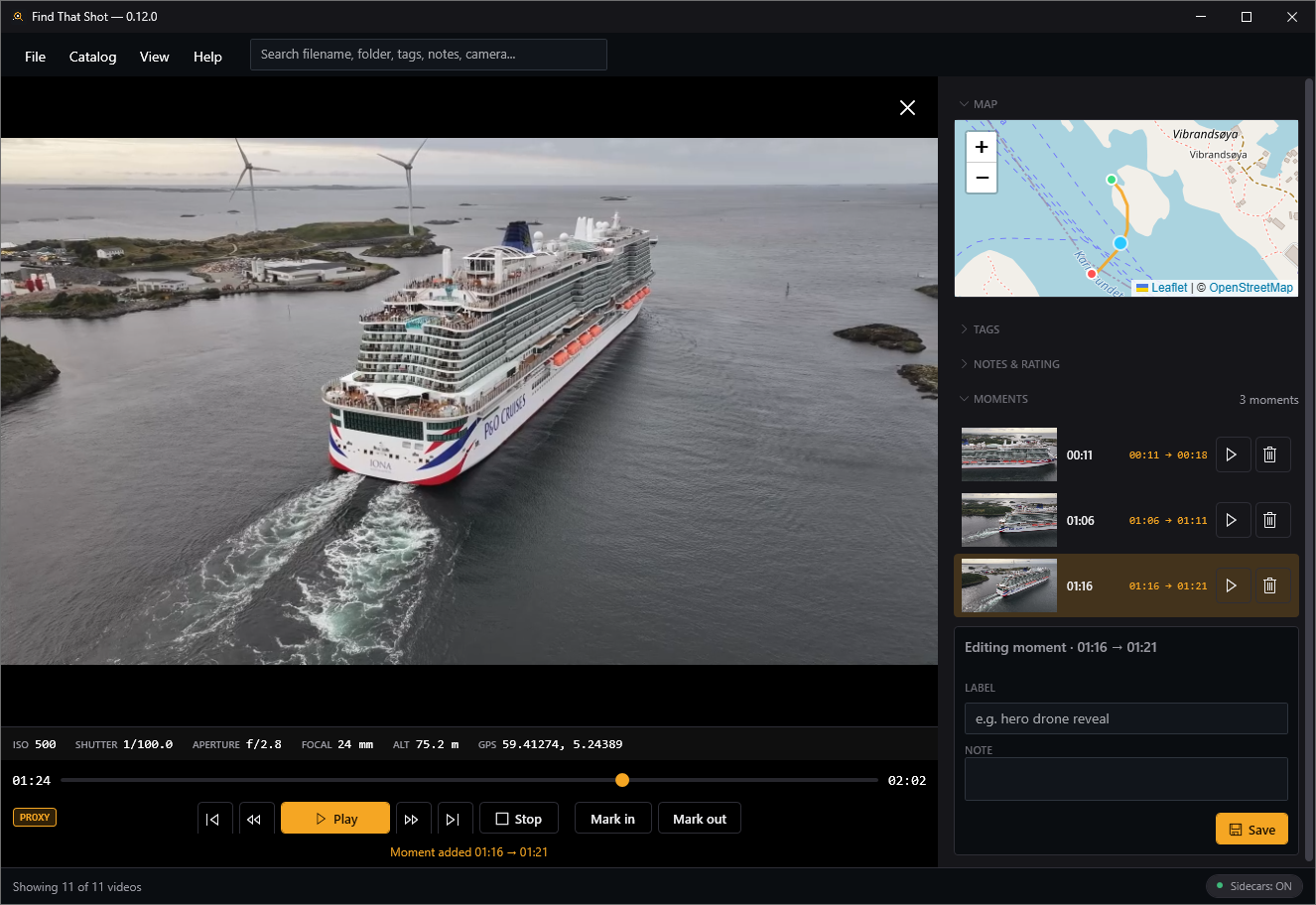
    The whole route is drawn as a polyline with start & end markers and per-point altitude.

  • Live position & telemetry while you watch

    A marker rides the path in sync with playback; an overlay shows ISO, shutter, aperture & altitude frame-by-frame.

  • Smooth 4K / 60p playback

    GPU-accelerated decoding plays high-bitrate DJI & GoPro clips at real time, not slow-motion.

Find That Shot review mode — a drone clip playing with a live telemetry strip (ISO, shutter, aperture, focal length, altitude, GPS), the flight path drawn on the sidebar map, and a list of captured moments.
Go deeper

The advanced stuff, one tab at a time

Power features for serious archives — explore whichever you care about, skip the rest.

AI that actually understands your footage

An opt-in CLIP model runs fully offline on your CPU — nothing is uploaded. It looks at frames sampled across each clip, so a match counts even if the subject only appears halfway through.

  • Search by plain English — "drone shot over snowy mountains at sunset."
  • Subject-tag suggestions you accept or reject — nothing is auto-applied.
  • Adaptive thresholds learn from your choices and sharpen over time.
drone shot over snowy mountains at sunset
98%
94%
91%

Mark the exact shot, not the whole file

A shot is rarely a whole clip. While reviewing, press I and O to capture a timestamped in/out range with its own thumbnail, label, rating, notes & tags.

  • Auto-grabbed thumbnail at the in-point — every moment has a frame.
  • Jump to seeks the player straight to that timestamp.
  • Search moments across the whole archive — "jump to 00:01:32."
00:12
01:32
03:05

Location & time become navigation

Stop scrolling endless folders. Ask where and when you shot something and let the archive answer.

  • Whole-archive map with clustering — click a cluster to scope the grid to it.
  • Year × month heatmap by when footage was actually captured.
  • Map & markers work offline — only the tiles need a connection.
38
12
6

A catalog that protects your work

Curate fearlessly. Every cleanup tool touches only the catalog — your source files are never moved, renamed, or deleted.

  • Find duplicates by metadata fingerprint — even copies on offline drives.
  • Offline clips stay searchable with a clear Offline badge.
  • Rotating, restorable backups of your catalog database.
DJI_0421.MP4 · D:\ArchiveKEEP
DJI_0421.MP4 · E:\BackupDUPLICATE
DJI_0421.MP4 · NAS\2025DUPLICATE
How it works

Three steps to a searchable archive

1

Add your folders

Point the app at any root directory on any drive — add as many as you like. Nothing is copied or moved.

2

Scan

It walks each folder, reads technical metadata with FFprobe, parses dates & locations, and generates thumbnails in the background.

3

Find that shot

Search, filter, tag, rate, mark moments, and review — across your entire library, online or offline.

Get started

Download Find That Shot

A self-contained Windows build with a one-click installer (auto-updates) or a portable zip. Free and open source under the GPLv3.

Requires Windows 10/11. FFmpeg is bundled — or install with winget install Gyan.FFmpeg.

First launch: the build isn't code-signed yet, so Windows may show “Windows protected your PC.” That's expected — click More info, then Run anyway. It's fully open source, so you can read every line on GitHub first if you like. And your footage is never modified — the app only ever reads your video files.

Hit a problem? In the app, use Help → Diagnostics → Copy full report and paste it into your bug report or email — it includes the version and recent logs, which makes issues far easier to fix.